PardisFXCurrency Exchange System
Request a demo
Built for exchange houses

The complete accounting system for currency exchange.

Multi-currency double-entry ledger, customer statements, remittances, cash vaults and audit-ready reports — one platform, nine languages.

Your data stays yours — encrypted backups, CSV export any time.

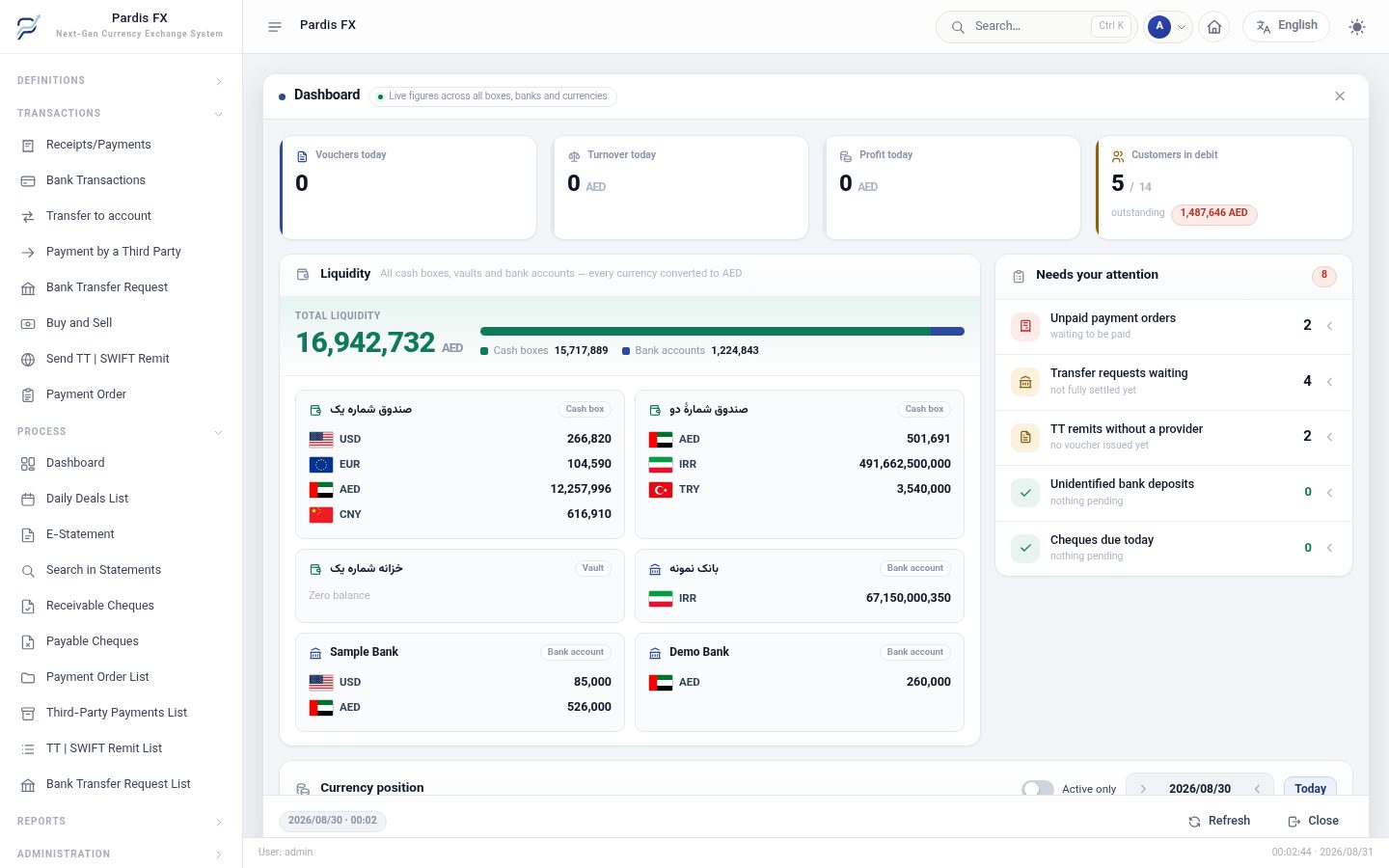
PardisFX dashboard

The live dashboard — cash, banks and currency position, in one screen. Figures shown are sample data.

9 interface languageswith real right-to-left layout
A separate database per exchangedata is never mixed
Double-entry, multi-currencyeach currency keeps its own balance
Encrypted backups you controlopened only with your own key
What it does

Built the way an exchange house actually works.

Not a general accounting package with a currency field bolted on. Every screen assumes buying, selling, remitting and settling in more than one currency at once.

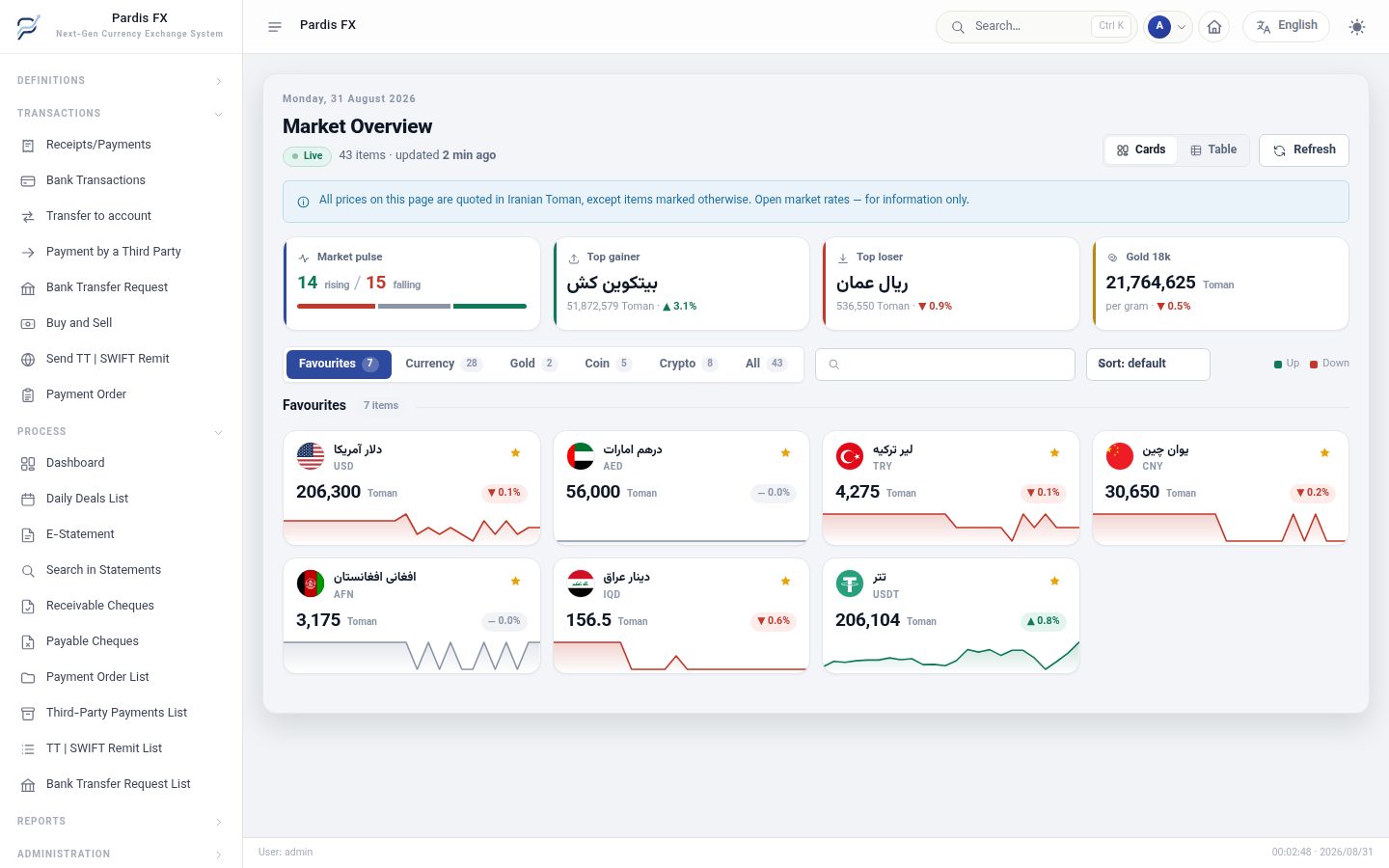
The rate board your dealers already watch

Live rates for every currency you trade, with the day's movement and a chart at a glance. It is informational only — the operator always sets the rate that goes on the voucher.

Add any currency yourself, in any country
Market overview

Reports your auditor will accept

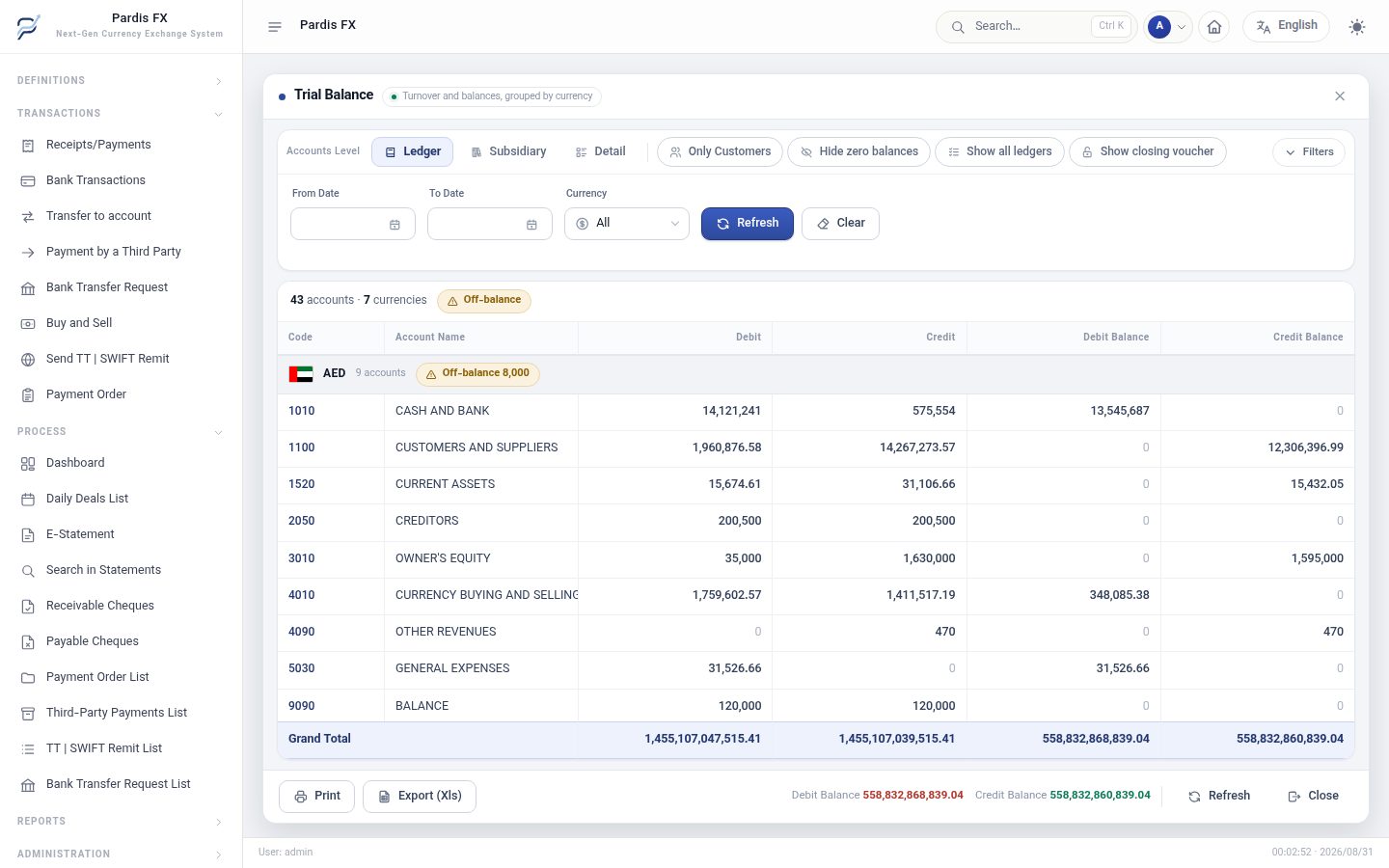
Trial balance, ledger book, journal, balance sheet, profit and loss, debtors and creditors — each broken out per currency, never merged into one figure. Plus a tested fiscal year-end close with revaluation and period locking.

Audited across five currencies before release
Trial balance

Deals and remittances, end to end

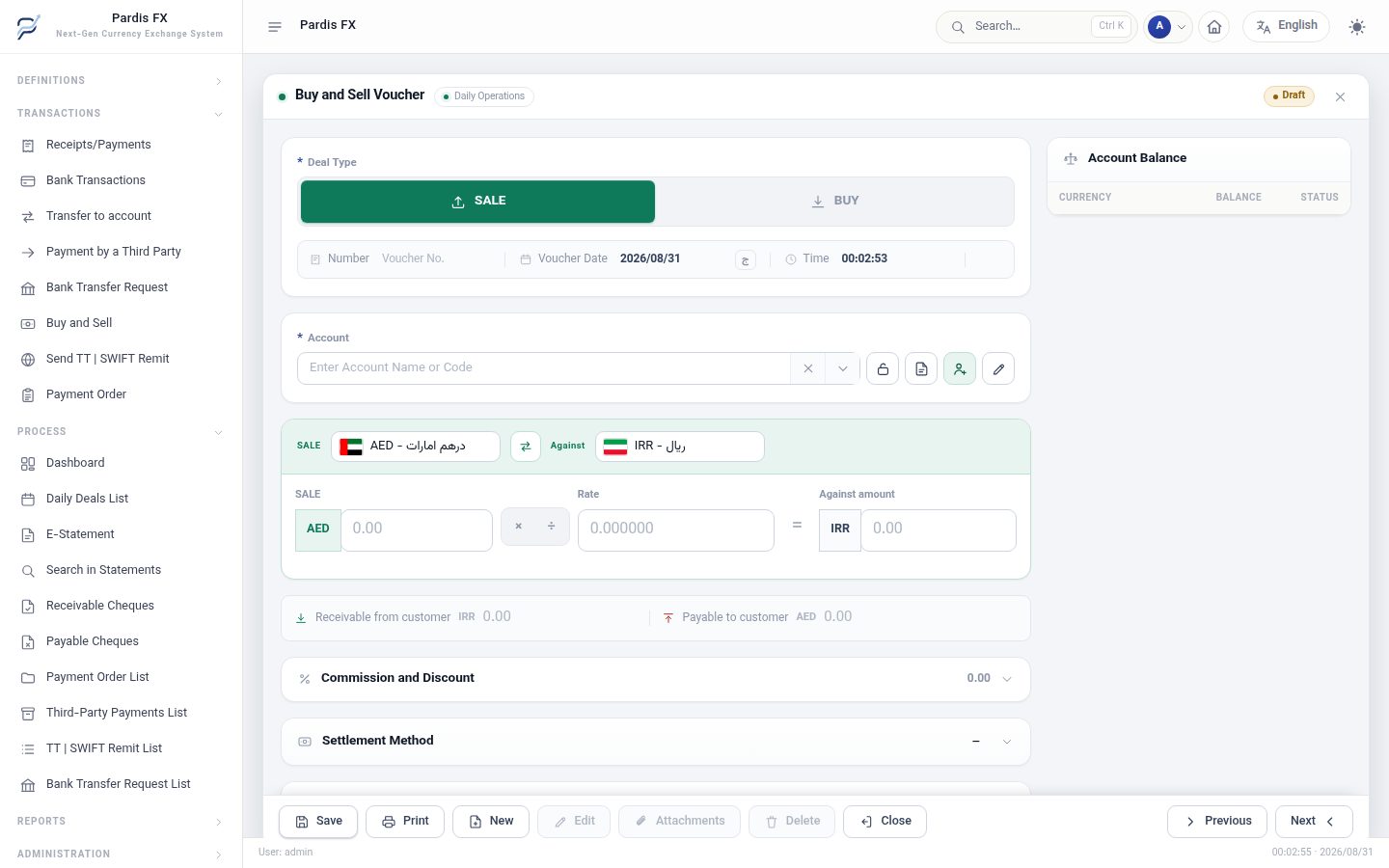
Buy and sell with the conversion rate, spread, commission and discount worked out as you type. Payment orders, pay-instead, bank transfer requests, TT and SWIFT remittances and cheques each get their own document.

Every entry posts to the ledger the moment it is saved
Buy and sell voucher

Cash and banks are real accounts

Vaults and bank accounts sit in the ledger like any other account — not as notes on the side.

Customer statements in their language

The statement a client receives is written in the language that client reads.

Debit red, credit green

Balances are coloured the way an accountant reads them, on every screen and every print.

Jalali and Gregorian

Both calendars, side by side, wherever a date appears.

Nine languages

Your staff work in their language. Your customers read theirs.

The interface, the account names and the voucher narration are all translated — not only the menu labels. Switch the language at the top of this page and the screenshots above change with it.

Right to left

فارسیPersian
العربيةArabic
اردوUrdu
کوردیKurdish
دریDari

Left to right

EnglishEnglish
TürkçeTurkish
中文Chinese
РусскийRussian
Customer ledger Voucher 2276
Received 11,000 AED from Gulf Star Trading
Customer account · AED
11,000 CR
Cash in from Gulf Star Trading
Main vault · AED
11,000 DR
Read the same voucher in another language

Right to left means the layout actually mirrors — not a flipped stylesheet. And numbers stay in Western digits in every language, so an amount reads the same to everyone who looks at it.

Getting started

Three steps, then you are running your books.

01

We set up your exchange

Your currencies, your chart of accounts, your branches and your operators — configured with you, not left as homework.

02

Your operators work the daily forms

Receipts, payments, deals, remittances, cheques. Every entry posts to the ledger as it is saved.

03

You read the books any day

Statements and reports are live, not monthly. When the year ends, the closing module handles revaluation and locking.

Coming from spreadsheets or an older system? We help move your customer balances across before you go live.

Security and ownership

The questions an exchange owner actually asks.

Your books are not in a shared table

Every exchange house has its own separate database. Data from two customers is never mixed in one file.

Backups only you can open

Each backup is encrypted with your own key. We seal it; you are the one who can unseal it.

Who sees what is your decision

Role-based permissions decide what each operator can open, enter and delete.

No lock-in

Export your full data to CSV whenever you want. If you leave, you leave with your records.

Pricing

One subscription. Every language included.

Priced per exchange house, not per feature. No charge for adding a language, a currency or a report.

Starter

Small offices and independent brokers

Figure not set yet
  • Up to 2 operators
  • Full multi-currency ledger
  • Customer statements and remittances
  • Standard report set
  • Email support
Request a demo

Professional

Growing exchange houses

Figure not set yet
  • Up to 10 operators
  • Everything in Starter
  • Fiscal year-end closing and revaluation
  • Full report and audit set
  • Encrypted backup and restore
  • Priority support
Request a demo

Enterprise

Multi-branch houses and institutions

Let's talkPriced per branch count
  • Unlimited operators and branches
  • Onboarding and data migration
  • Named support contact
  • Custom report work
Request a demo

All plans include all nine languages, unlimited currencies and unlimited customers.

Questions

Before you ask us.

Can I see it before I decide?

Yes. A demo runs on the real screens with sample data, in your language, and takes about thirty minutes.

If I stop using it, do I get my data?

Yes. You can export your full records to CSV at any time, while you are a customer and when you leave.

Can I add my own currencies?

Yes, any currency, yourself. Nothing in the system assumes a fixed list, so an exchange in any country can work with what it actually trades.

Does it handle the Jalali calendar?

Yes, alongside the Gregorian calendar. Reports and statements can be read on either.

Who can see my books?

Only the users you authorise, and only the parts their role allows. Each exchange house's data sits in its own database.

How do the backups work?

A backup is taken automatically every night and test-restored before it is kept. You can also create one yourself and download it, sealed with your own key.

Talk to us

See it running on your own numbers.

Tell us how your exchange works and we will walk you through the system on the screens you would actually use — in your language, in about thirty minutes.

Request a demo

Five fields. We reply the same day.

We use this only to contact you about the demo.

Thank you — your request has been noted. We will be in touch shortly.